




Flutter_BottomNavigationBar组件介绍
BottomNavigationBar 是底部导航条,可以让我们定义底部Tab切换,bottomNavigationBar是 Scaffold组件的参数。
import 'package:flutter/material.dart';
import 'listData.dart';

void main() {
  runApp(const MyApp());
}

class MyApp extends StatelessWidget {
  // ignore: use_key_in_widget_constructors
  const MyApp({Key? key}) : super(key: key);

  @override
  Widget build(BuildContext context) {
    return MaterialApp(
      title: 'Flutter Demo',
      theme: ThemeData(
        primarySwatch: Colors.blue,
      ),
      // home:  HomePage(),
      home: const Main(),
    );
  }
}


class Main extends StatefulWidget {

  const Main({ Key? key }) : super(key: key);

  @override
  // ignore: library_private_types_in_public_api
  _MainState createState() => _MainState();
}

class _MainState extends State<Main> {
  final List<String> list = [];
  int _currentIndex = 0;
  @override
  Widget build(BuildContext context) {
    return Scaffold(
      appBar: AppBar(
        title: const Text('Flutter App'),
      ),
      floatingActionButton: FloatingActionButton(
        onPressed: (){
          setState(() {
            list.add('我是一个新增的列表');
          });
        },
        child: const Icon(Icons.add),
      ),

      body: ListView(
        children: list.map((e) => ListTile(title: Text(e))).toList(),
      ),
      bottomNavigationBar: BottomNavigationBar(
        currentIndex: _currentIndex,
        onTap: (int index){
          print(index);
          setState(() {
            _currentIndex = index;
          });
        },
        items: const [
          BottomNavigationBarItem(
            icon: Icon(Icons.home),
            label: '首页',
          ),
          BottomNavigationBarItem(
            icon: Icon(Icons.category),
            label: '分类',
          ),
          BottomNavigationBarItem(
            icon: Icon(Icons.settings),
            label: '设置',
          )
        ],
      )
    );
  }
}
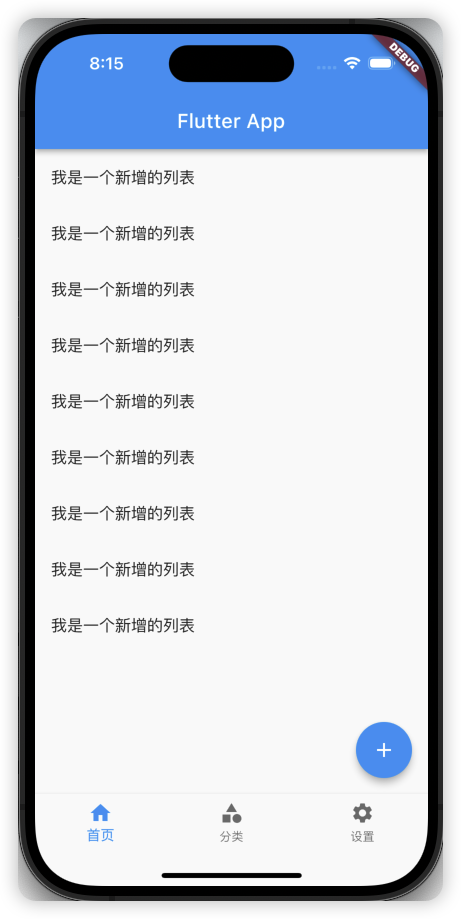
BottomNavigationBar 常见的属性
| 属性 | 说明 |
|---|---|
| currentIndex | 默认选择第几个 |
| onTap | 选中变化回调函数 |
| items | List 底部导航条按钮集合 |
| fixedColor | 选中颜色 |
| type | BottomNavigationBarType.fixed 选中颜色 |
| iconSize | 图标大小 |
| elevation | 阴影大小 |
BottomNavigationBar 自定义底部导航实现页面切换
// home页面
import 'package:flutter/material.dart';

class HomePage extends StatefulWidget {
  const HomePage({super.key});

  get list => null;

  @override
  State<HomePage> createState() => _HomePageState();
}

class _HomePageState extends State<HomePage> {
  final List<String> list = [];
  @override
  Widget build(BuildContext context) {
    return const Center(
      child:  Text('HomePage'),
    );
  }
}
// category页面
import 'package:flutter/material.dart';

class CategoryPage extends StatefulWidget {
  const CategoryPage({super.key});

  @override
  State<CategoryPage> createState() => _CategoryPageState();
}

class _CategoryPageState extends State<CategoryPage> {
  @override
  Widget build(BuildContext context) {
    return const Center(
      child: Text('CategoryPage'),
    );
  }
}
// setting页面
import 'package:flutter/material.dart';


class SettingPage extends StatefulWidget {
  const SettingPage({super.key});

  @override
  State<SettingPage> createState() => _SettingPageState();
}

class _SettingPageState extends State<SettingPage> {
  @override
  Widget build(BuildContext context) {
    return const Center(
      child: Text('SettingPage'),);
  }
}
// user页面
import 'package:flutter/material.dart';


class UserPage extends StatefulWidget {
  const UserPage({super.key});

  @override
  State<UserPage> createState() => _UserPageState();
}

class _UserPageState extends State<UserPage> {
  @override
  Widget build(BuildContext context) {
    return const Center(
      child: Text('UserPage'),
    );
  }
}
// tabs页面
import 'package:flutter/material.dart';
import 'package:flutter_application_1/user.dart';

import 'home.dart';
import 'category.dart';
import 'setting.dart';

class TabsPage extends StatefulWidget {
  const TabsPage({super.key});

  @override
  State<TabsPage> createState() => _TabsPageState();
}

class _TabsPageState extends State<TabsPage> {
  int _currentIndex = 0;
  final List _pageList = [
    const HomePage(),
    const CategoryPage(),
    const SettingPage(),
    const UserPage(),
  ];
  @override
  Widget build(BuildContext context) {
    return Scaffold(
        appBar: AppBar(
          title: const Text('Flutter App'),
        ),

        body: _pageList[_currentIndex],
        bottomNavigationBar: BottomNavigationBar(
          currentIndex: _currentIndex,
          type: BottomNavigationBarType.fixed, // 如果有4个以上的按钮,必须设置type
          fixedColor: Colors.red, // 选中的颜色
          iconSize: 35, // 图标大小
          onTap: (int index){
            print(index);
            setState(() {
              _currentIndex = index;
            });
          },
          items: const [
            BottomNavigationBarItem(
              icon: Icon(Icons.home),
              label: '首页',
            ),
            BottomNavigationBarItem(
              icon: Icon(Icons.category),
              label: '分类',
            ),
            BottomNavigationBarItem(
              icon: Icon(Icons.settings),
              label: '设置',
            ),
            // 我的
            BottomNavigationBarItem(
              icon: Icon(Icons.person),
              label: '我的',
            ),
          ],
        )
    );
  }

}
// main.dart
import 'package:flutter/material.dart';
import 'package:flutter_application_1/tabs.dart';
import 'home.dart';
// import 'listData.dart';

void main() {
  runApp(const MyApp());
}

class MyApp extends StatelessWidget {
  // ignore: use_key_in_widget_constructors
  const MyApp({Key? key}) : super(key: key);

  @override
  Widget build(BuildContext context) {
    return MaterialApp(
      title: 'Flutter Demo',
      theme: ThemeData(
        primarySwatch: Colors.blue,
      ),
      // home:  HomePage(),
      home: const Main(),
    );
  }
}
class Main extends StatefulWidget {

  const Main({ Key? key }) : super(key: key);

  @override
  // ignore: library_private_types_in_public_api
  _MainState createState() => _MainState();
}

class _MainState extends State<Main> {

  @override
  Widget build(BuildContext context) {
    return const TabsPage();
  }
}
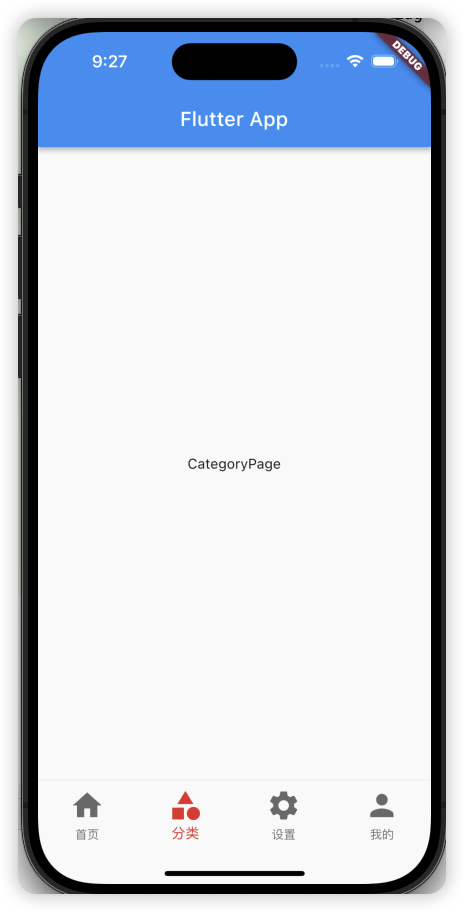
FloatingActionButton实现类似闲鱼App底部导航凸起按钮
import 'package:flutter/material.dart';
import 'package:flutter_application_1/user.dart';

import 'home.dart';
import 'category.dart';
import 'setting.dart';
import 'message.dart';

class TabsPage extends StatefulWidget {
  const TabsPage({super.key});

  @override
  State<TabsPage> createState() => _TabsPageState();
}

class _TabsPageState extends State<TabsPage> {
  int _currentIndex = 0;
  final List _pageList = [
    const HomePage(),
    const CategoryPage(),
    const MessagePage(),
    const SettingPage(),
    const UserPage(),
  ];
  @override
  Widget build(BuildContext context) {
    return Scaffold(
      appBar: AppBar(
        title: const Text('Flutter App'),
      ),

      body: _pageList[_currentIndex],
      bottomNavigationBar: BottomNavigationBar(
        currentIndex: _currentIndex,
        type: BottomNavigationBarType.fixed, // 如果有4个以上的按钮,必须设置type
        fixedColor: Colors.red, // 选中的颜色
        //iconSize: 35, // 图标大小
        onTap: (int index){
          print(index);
          setState(() {
            _currentIndex = index;
          });
        },
        items: const [
          BottomNavigationBarItem(
            icon: Icon(Icons.home),
            label: '首页',
          ),
          BottomNavigationBarItem(
            icon: Icon(Icons.category),
            label: '分类',
          ),
          BottomNavigationBarItem(
            icon: Icon(Icons.message),
            label: '消息',
          ),
          BottomNavigationBarItem(
            icon: Icon(Icons.settings),
            label: '设置',
          ),
          // 我的
          BottomNavigationBarItem(
            icon: Icon(Icons.person),
            label: '我的',
          ),
        ],
      ),
      floatingActionButton: Container(
        width: 60,
        height: 60,
        decoration: BoxDecoration(
          borderRadius: BorderRadius.circular(30),
          color: Colors.white,
        ),
        margin: const EdgeInsets.only(top: 4),
        padding: const EdgeInsets.all(4),
        child: FloatingActionButton(
          onPressed: (){
            setState(() {
              _currentIndex = 2;
            });
          },
          backgroundColor: _currentIndex == 2 ? Colors.red :Colors.blue,
          child: const Icon(Icons.add),
        ),
      ),
      floatingActionButtonLocation: FloatingActionButtonLocation.centerDocked,
    );
  }
}
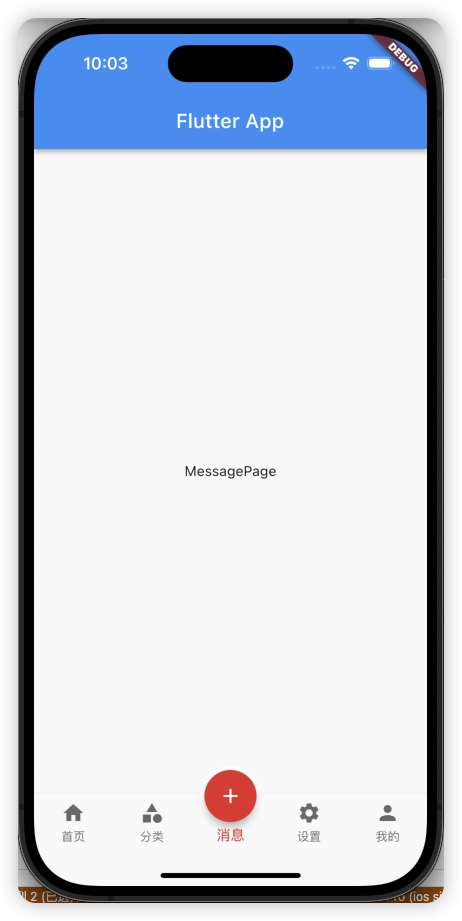
FloatingActionButton详解
FloatingActionButton简称FAB ,可以实现浮动按钮,也可以实现类似闲鱼app的底部凸起导航
| 属性名称 | 属性值 |
|---|---|
| child | 子视图,一般为Icon,不推荐使用文字 |
| tooltip | FAB被长按时显示,也是无障碍功能 |
| backgroundColor | 背景颜色 |
| elevation | 未点击的时候的阴影 |
| highlightElevation | 点击的时候的阴影, 默认12.0 |
| onPressed | 点击事件回调 |
| mini | 是否是mini类型默认false |
| shape | 可以定义FAB的形状等 |