
Wrap组件
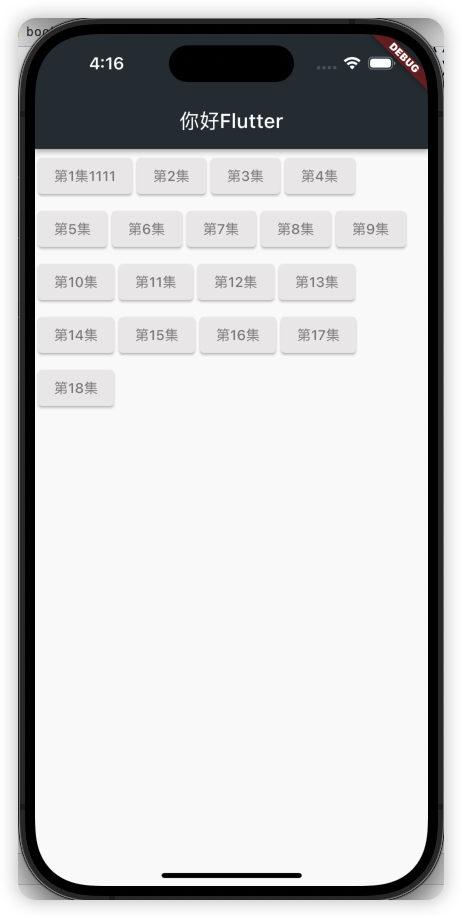
Wrap可以实现流布局,单行的Wrap跟Row表现几乎一致,单列的Wrap则跟Column表现几乎一致。但 Row与Column都是单行单列的,Wrap则突破了这个限制,mainAxis上空间不足时,则向crossAxis上 去扩展显示。
| 属性 | 说明 |
|---|---|
| direction | 主轴方向 |
| alignment | 主轴对齐方式 |
| spacing | 主轴方向上的间距 |
| textDirection | 文本方向 |
| verticalDirection | 定义了children摆放顺序,默认是down,见Flex相关属性介绍。 |
| runAlignment | run的对齐方式。run可以理解为新的行或者列,如果是水平方向布局的话,run可以理解为新的一行 |
| runSpacing | run的间距。run可以理解为新的行或者列,如果是水平方向布局的话,run可以理解为新的一行 |
Wrap组件的使用
import 'package:flutter/material.dart';
import 'listData.dart';

void main() {
  runApp(MaterialApp(
    home: Scaffold(
      appBar: AppBar(
        title: const Text('你好Flutter'),
        backgroundColor: Colors.blueGrey[900],
      ),
      body: const LayoutDemo(),
    ),
  ));
}

// ignore: must_be_immutable

class LayoutDemo extends StatelessWidget {
  const LayoutDemo({Key? key}) : super(key: key);
  @override
  Widget build(BuildContext context) {
    return Padding(
      padding: const EdgeInsets.all(3),
      child: Wrap(
        spacing: 5,
        runSpacing: 5,
        // direction: Axis.vertical,
        // alignment:WrapAlignment.start,
        // runAlignment: WrapAlignment.center,
        children: <Widget>[
          Button("第1集1111", onPressed: () {}),
          Button("第2集", onPressed: () {}),
          Button("第3集", onPressed: () {}),
          Button("第4集", onPressed: () {}),
          Button("第5集", onPressed: () {}),
          Button("第6集", onPressed: () {}),
          Button("第7集", onPressed: () {}),
          Button("第8集", onPressed: () {}),
          Button("第9集", onPressed: () {}),
          Button("第10集", onPressed: () {}),
          Button("第11集", onPressed: () {}),
          Button("第12集", onPressed: () {}),
          Button("第13集", onPressed: () {}),
          Button("第14集", onPressed: () {}),
          Button("第15集", onPressed: () {}),
          Button("第16集", onPressed: () {}),
          Button("第17集", onPressed: () {}),
          Button("第18集", onPressed: () {}),
        ],
      ),
    );
  }
}

class Button extends StatelessWidget {
  String text;
  void Function()? onPressed;
  Button(this.text, {Key? key, required this.onPressed}) : super(key: key);
  @override
  Widget build(BuildContext context) {
    return ElevatedButton(
      onPressed: onPressed,
      style: ButtonStyle(
        backgroundColor:
            MaterialStateProperty.all(const Color.fromARGB(255, 236, 233, 233)),
        foregroundColor: MaterialStateProperty.all(Colors.black45),
      ),
      child: Text(text),
    );
  }
}
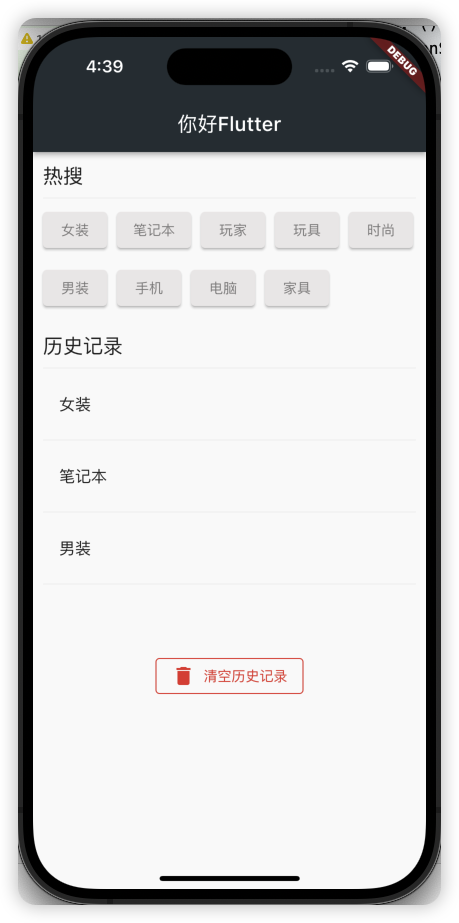
Wrap组件搜索页面布局
import 'package:flutter/material.dart';
import 'listData.dart';

void main() {
  runApp(MaterialApp(
    home: Scaffold(
      appBar: AppBar(
        title: const Text('你好Flutter'),
        backgroundColor: Colors.blueGrey[900],
      ),
      body: const LayoutDemo(),
    ),
  ));
}

// ignore: must_be_immutable

class LayoutDemo extends StatelessWidget {
  const LayoutDemo({Key? key}) : super(key: key);
  @override
  Widget build(BuildContext context) {
    return ListView(
      padding: const EdgeInsets.all(10),
      children: [
        Row(
          children: [
            Text(
              '热搜',
              style: Theme.of(context).textTheme.titleLarge,
            )
          ],
        ),
        const Divider(),
        Wrap(
          spacing: 10,
          runSpacing: 10,
          children: [
            Button('女装', onPressed: () {}),
            Button('笔记本', onPressed: () {}),
            Button('玩家', onPressed: () {}),
            Button('玩具', onPressed: () {}),
            Button('时尚', onPressed: () {}),
            Button('男装', onPressed: () {}),
            Button('手机', onPressed: () {}),
            Button('电脑', onPressed: () {}),
            Button('家具', onPressed: () {}),
          ],
        ),
        const SizedBox(
          height: 20,
        ),
        Row(
          children: [
            Text(
              '历史记录',
              style: Theme.of(context).textTheme.titleLarge,
            )
          ],
        ),
        const Divider(),
        Column(
          children: const[
            ListTile(
              title: Text('女装'),
            ),
            Divider(),
            ListTile(
              title: Text('笔记本'),
            ),
            Divider(),
            ListTile(
              title: Text('男装'),
            ),
            Divider(),
          ],
        ),
        const SizedBox(
          height: 60,
        ),
        Row(
          mainAxisAlignment: MainAxisAlignment.center,
          children: [
            OutlinedButton.icon(
              onPressed: (){},
              style: ButtonStyle(
                // 红线
                side: MaterialStateProperty.all(const BorderSide(color: Colors.red))
              ),
              icon: const Icon(Icons.delete, color: Colors.red,),
              label: const Text('清空历史记录', style: TextStyle(color: Colors.red),)
            )
          ],
        ),
      ],
    );
  }
}

class Button extends StatelessWidget {
  String text;
  void Function()? onPressed;
  Button(this.text, {Key? key, required this.onPressed}) : super(key: key);
  @override
  Widget build(BuildContext context) {
    return ElevatedButton(
      onPressed: onPressed,
      style: ButtonStyle(
        backgroundColor:
            MaterialStateProperty.all(const Color.fromARGB(255, 236, 233, 233)),
        foregroundColor: MaterialStateProperty.all(Colors.black45),
      ),
      child: Text(text),
    );
  }
}