




Flutter 微信支付之前的准备工作注册开放平台、申请开发者、创建应用、申请微信支付、生成商户平台账户
微信APP 支付前的准备工作,以及需要获取内容
- 准备工作:必须要有企业营业执照、对公账户。
- 需要获取内容:
- APPID:应用APPID(必须配置,开户邮件中可查看)
- MCHID:微信支付商户号(必须配置,开户邮件中可查看)
- KEY:API 密钥,参考开户邮件设置(必须配置,登录商户平台自行设置)
开放平台商户申请接入文档、入口
官方接入文档:http://kf.qq.com/faq/1612267j2eQ3161226jIVbA3.html
官方微信支付入口文档:https://pay.weixin.qq.com/
开放平台商户申请步骤(APP 支付)
第一步:注册开放平台账号
登录开放平台(open.weixin.qq.com),注册成为微信开放平台开发者。
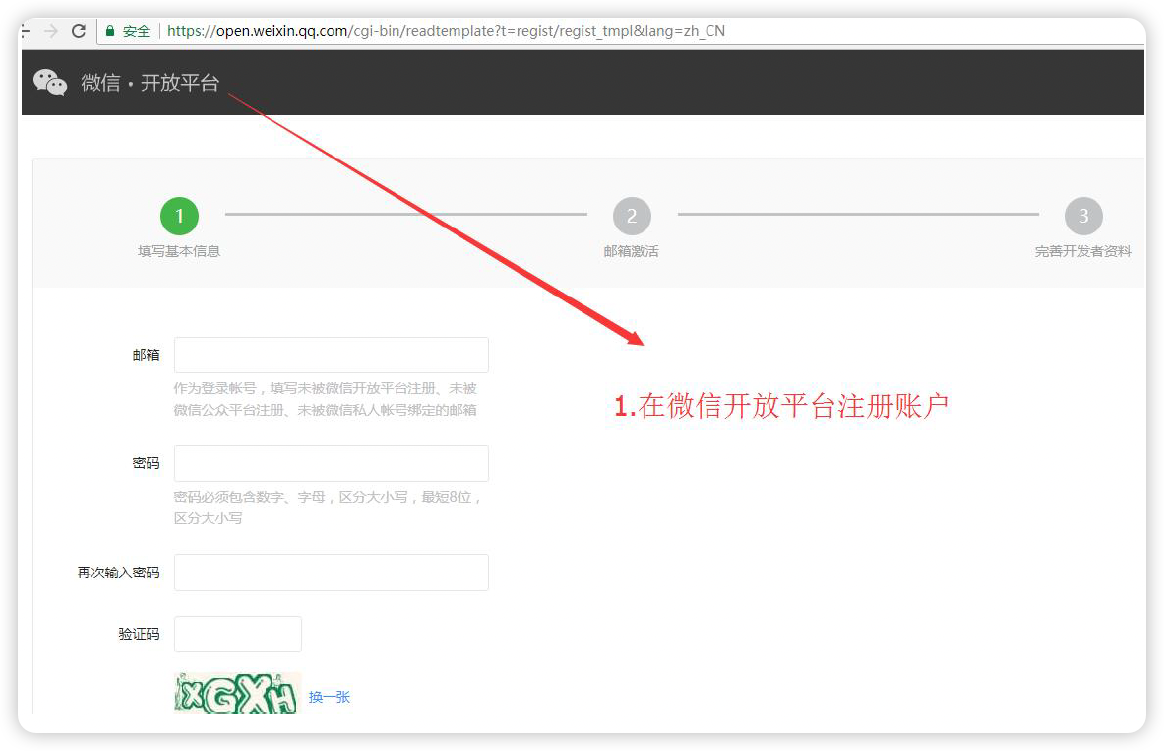
第二步:认证开放平台并创建APP
- 开放平台需进行开发者资质认证后才可申请微信支付,认证费:300 元/次;
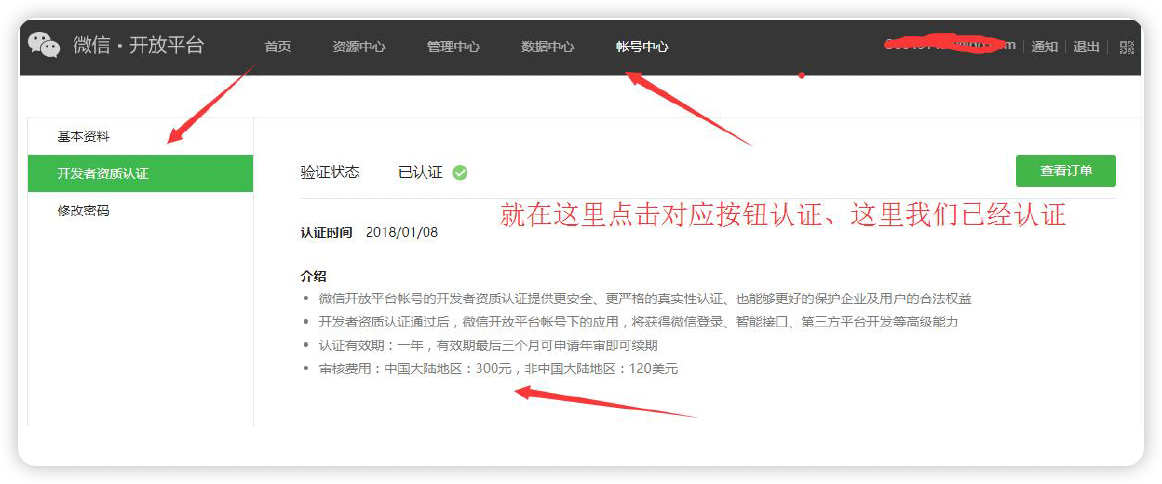
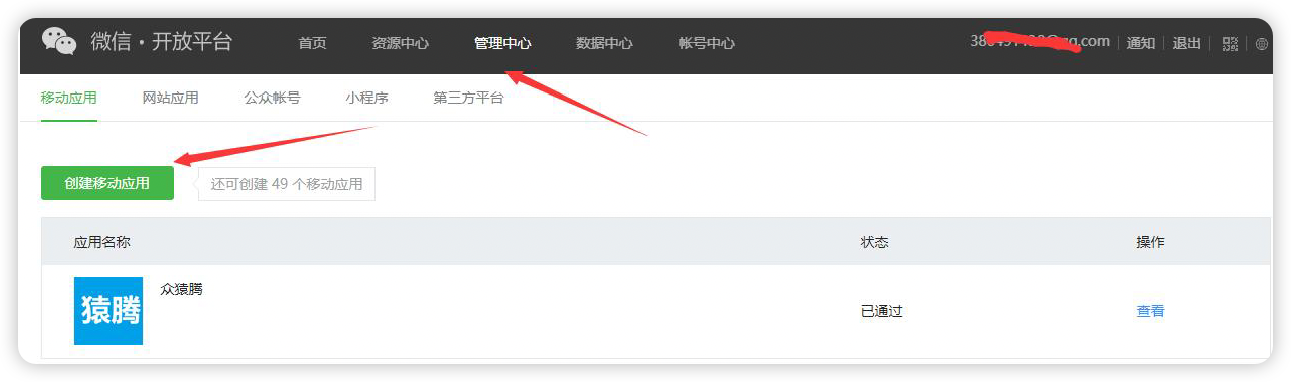
认证完成在微信开放平台创建app、并提交审核获取AppID

填写平台信息
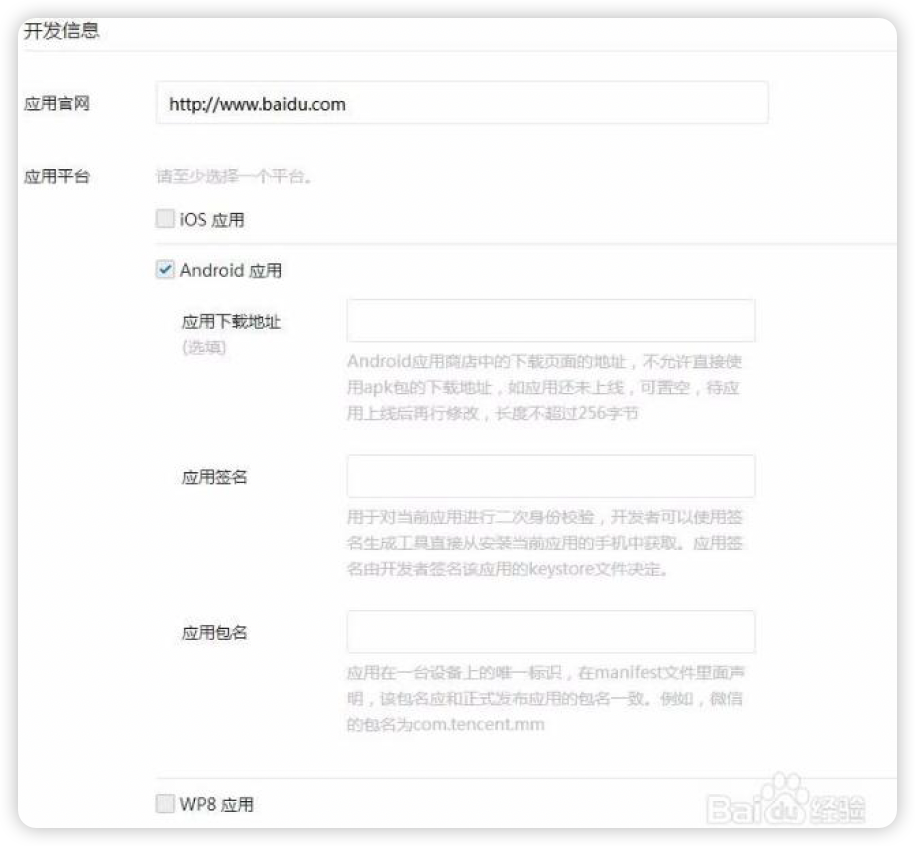
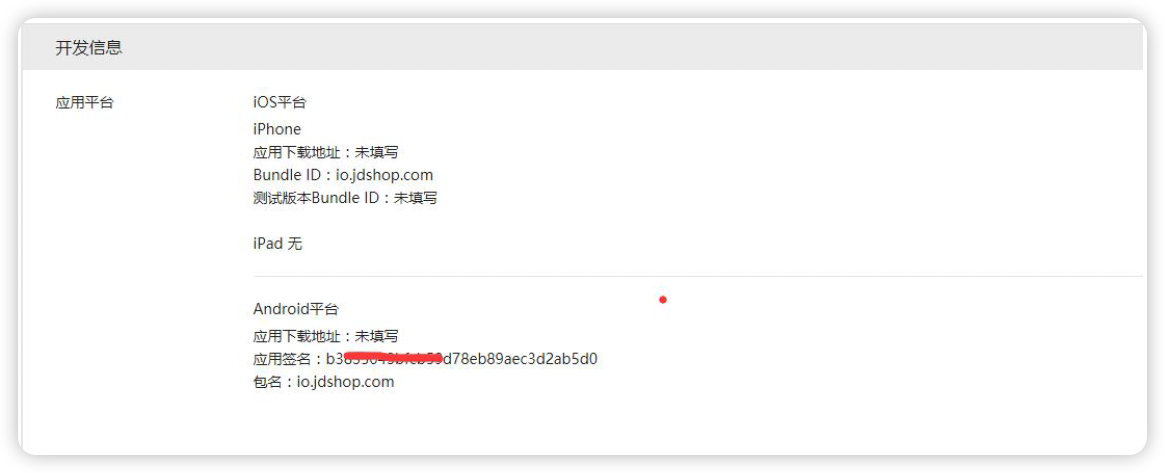
注意:申请的时候需要你填写应用签名和包名。签名需要用通过微信工具生成(下面介绍),包名将是你此次集成项目的包名。两个必须填写对。有一个不对,将调不起微信支付。如何获取报名签名请查看文档目录,这里的信息也可以后期修改。
提交资料申请微信支付
应用创建好后,登录微信开放平台,点击【管理中心】,选择需要申请支付功能对应的APP,开始填写资料等待审核,审核时间为1-5 个工作日内。

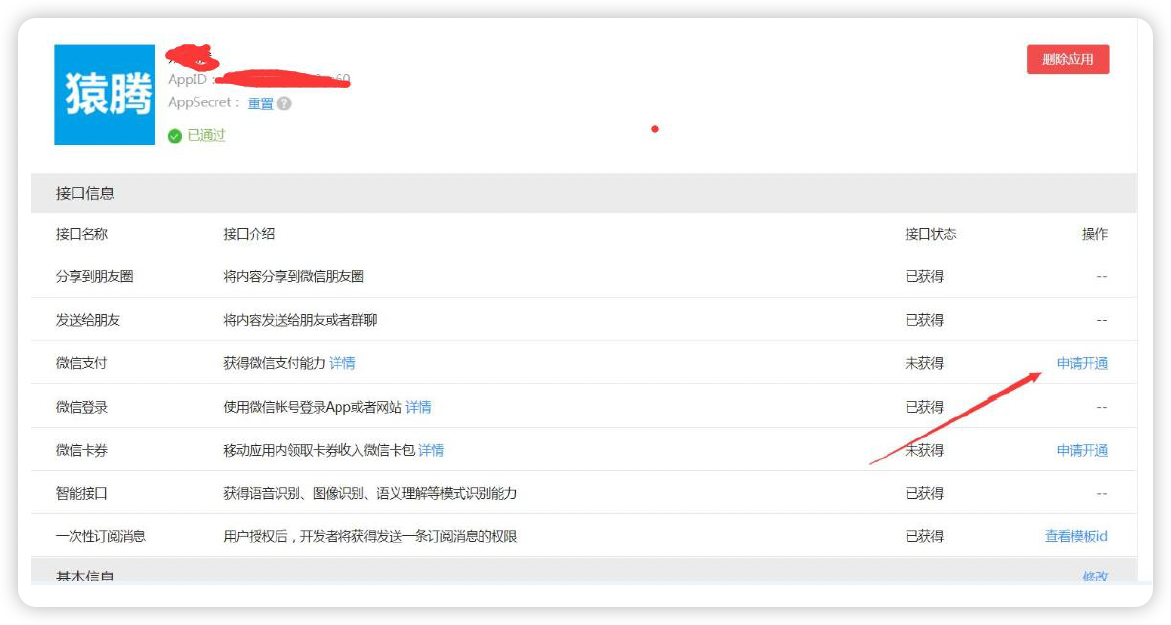

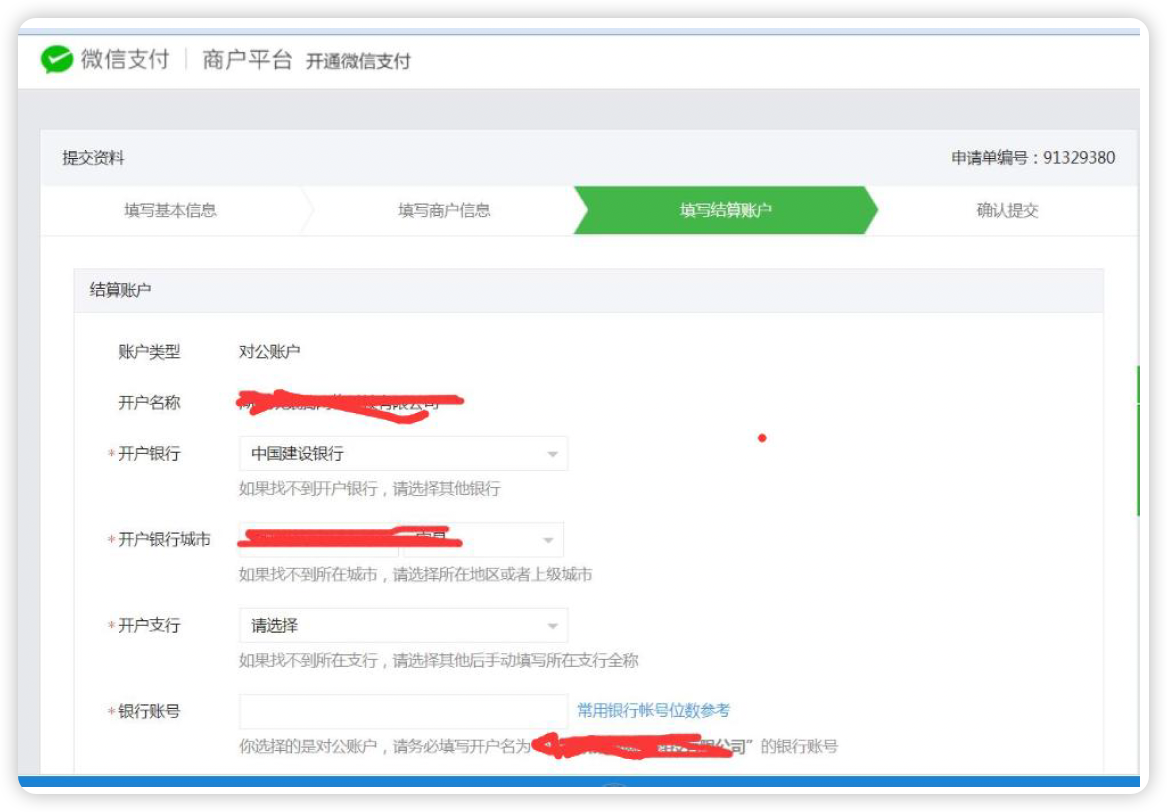
注意:信息必须如实填写,尤其是APP 截图的内容,以及销售商品的分类选择要和自己公司的匹配,不然容易审核失败。审核失败后,看看失败原因、修改重新提交申请。
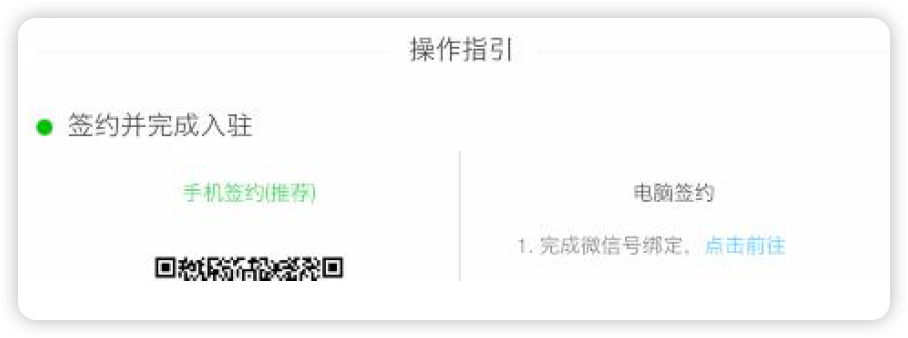
开户成功,登录商户平台进行验证
资料审核通过后,商户信息会发到您的账户邮箱里面,请登录联系人邮箱查收商户
号和密码,并登录商户平台填写财付通备付金打的小额资金数额,完成账户验证。(
)

用微信给你发的商户号登陆对应的微信商户平台,获取API 密钥
API 密钥,参考开户邮件设置(必须配置,登录商户平台自行设置)
设置地址:https://pay.weixin.qq.com/index.php/account/api_cert
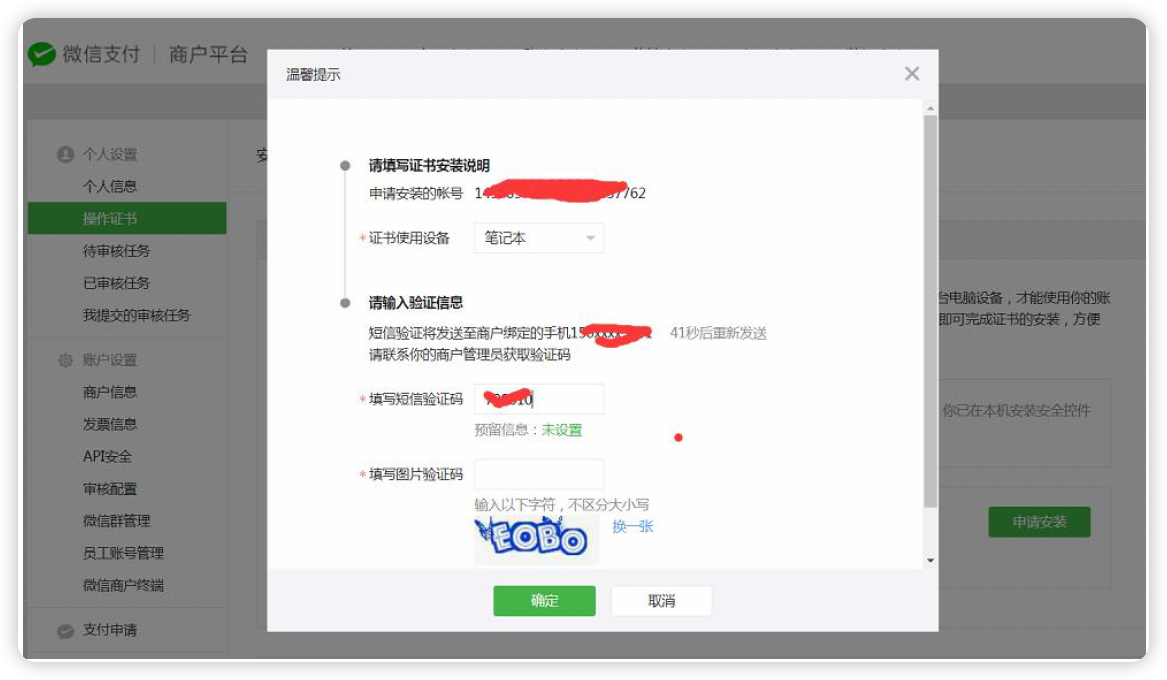
设置的时候可能会提示你安装证书
准备部署
APPID:应用APPID(必须配置,开户邮件中可查看)
MCHID:微信支付商户号(必须配置,开户邮件中可查看)
KEY:API 密钥,参考开户邮件设置(必须配置,登录商户平台自行设置)
设置地址:https://pay.weixin.qq.com/index.php/account/api_cert
商户key 设置文档:https://jingyan.baidu.com/article/75ab0bcbbf7034d6864db2c3.html
修改应用包名
Android 修改应用包名:
- 修改android->app->src->main->AndroidManifest.xml 中修改package="xxx.xxx.xxx";
- 在android->app->src->build.gradle 中修改applicationId "xxx.xxx.xxx";
- 需要修改android->app->src->main ...... MainActivity.java 对应的包路径(包路径就是文件夹名称)
Ios 修改应用包名:打包的时候修改Bundle Identifier 的值就可以了
用微信工具获取应用签名
- 需要签名打包您的App,并保存好签名文件以及签名密码。
- 把刚打包的app 发到手机上面安装
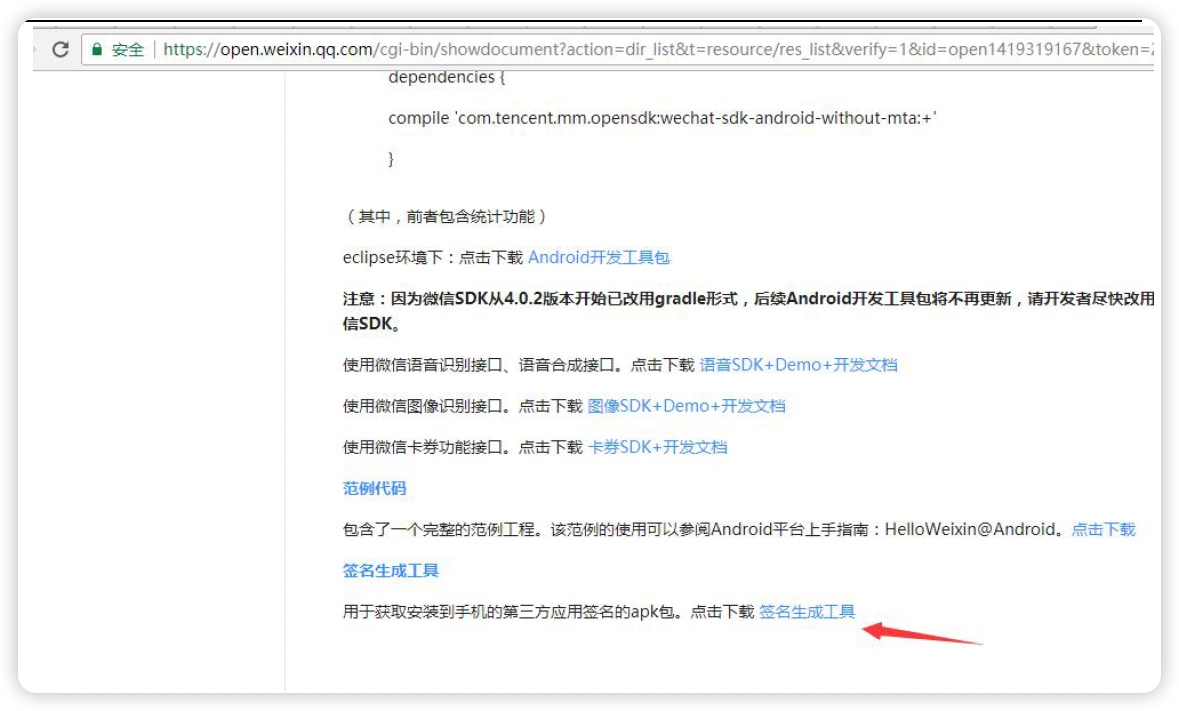
- 使用微信官方工具获取当前应用的签名。
下载签名工具后安装到手机
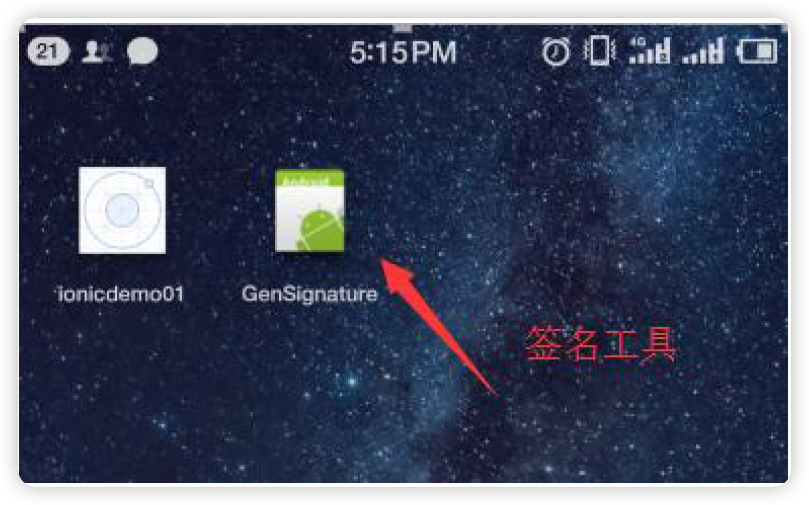
安装完成以后双击获取签名
Flutter 微信支付实现流程、微信支付后台PHP 代码分析、以及在Android 中实现微信支付
- 官方流程图:https://pay.weixin.qq.com/wiki/doc/api/app/app.php?chapter=8_3
- 简单流程:
- 调用后台api 接口生成签名字段
- 调用支付插件传入签名字段完成支付
- 支付完成以后处理回调
Android 中实现微信支付
https://pub.dev/packages/fluwx
配置依赖
fluwx: ^3.4.2
引入
import 'package:fluwx/fluwx.dart';
注册微信api
void initState() {
  super.initState();
  registerWxApi(
    appId: "wx5881fa2638a2ca60",
    universalLink: "https://your.univerallink.com/link/");
  weChatResponseEventHandler.distinct((a, b) => a == b).listen((res) {
    if (res is WeChatAuthResponse) {
      setState(() {
        print("state :${res.state} \n code:${res.code}");
      });
    }
  });
  weChatResponseEventHandler.listen((res) {
    if (res is WeChatPaymentResponse) {
      setState(() {
        print("pay :${res.isSuccessful}");
      });
    }
  });
}
实现微信支付微信登录微信分享等
body: Center(
  child: Column(
    mainAxisAlignment: MainAxisAlignment.center,
    children: [
      RaisedButton(
        child: Text('微信登录'),
        onPressed: () async {
          // print('微信登录');
          var result = await sendWeChatAuth(
            scope: "snsapi_userinfo", state: "wechat_sdk_demo_test");
          print(result);
        },
      ),
      SizedBox(height: 10),
      RaisedButton(
        child: Text('微信支付'),
        onPressed: () async {
          var apiUrl = 'http://agent.itying.com/wxpay/';
          var myPayInfo = await Dio().get(apiUrl);
          Map myInfo = json.decode(myPayInfo.data);
          payWithWeChat(
            appId: myInfo['appid'].toString(),
            partnerId: myInfo['partnerid'].toString(),
            prepayId: myInfo['prepayid'].toString(),
            packageValue: myInfo['package'].toString(),
            nonceStr: myInfo['noncestr'].toString(),
            timeStamp: myInfo['timestamp'],
            sign: myInfo['sign'].toString(),
          ).then((data) {
            print("---》$data");
          });
        },
      ),
    ],
  ),
),
Android 中注意事项以及配置signingConfigs
注意:
1. 微信开放平台必须配置**应用包名**和**应用签名
1. android 应用包名称必须和微信开放平台配置的一样
1. 微信开放平台配置应用签名的时候使用的keystore 文件必须和正式打包的keystore 签名文件一致。
1. 代码中配置的Appid 必须和开放平台一致
1. 生成预支付信息的服务器API 接口得提前准备好
1. android 必须正式打包后才能进行微信支付,如果想真机调试可以调用微信支付需要配置签名信息
Android 中配置signingConfigs:
找到android /app/build.gradle 配置下面代码
signingConfigs {
release {//发布版本的签名配置
storeFile file('jdshop.jks')
keyAlias "仿京东商城"
storePassword "123456"
keyPassword "123456"
}
debug {//调试版本的签名配置
storeFile file('jdshop.jks')
keyAlias "仿京东商城"
storePassword "123456"
keyPassword "123456"
}
}
buildTypes {
release {
// TODO: Add your own signing config for the release build.
// Signing with the debug keys for now, so `flutter run --release` works.
signingConfig signingConfigs.release
}
debug {
// TODO: Add your own signing config for the release build.
// Signing with the debug keys for now, so `flutter run --release` works.
signingConfig signingConfigs.debug
}
}
universalLink 和xcode 中的一些配置
微信官方Ios 接入指南:https://developers.weixin.qq.com/doc/oplatform/Mobile_App/Access_Guide/iOS.html
以前版本的ios 中实现微信支付的话只需要配置Schema 就可以了,但是新版本的ios 中要实现微信支付还需要配置Universal Link。
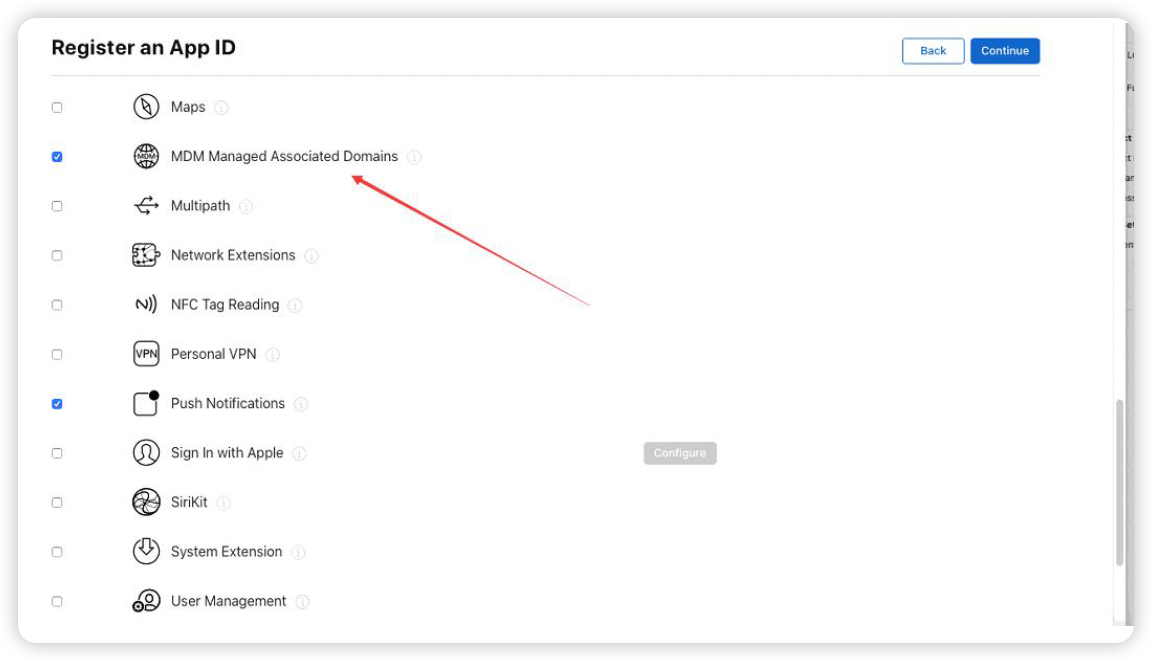
- 新建Identifiers 或者编辑以前的Identifiers 开通Associated Domains
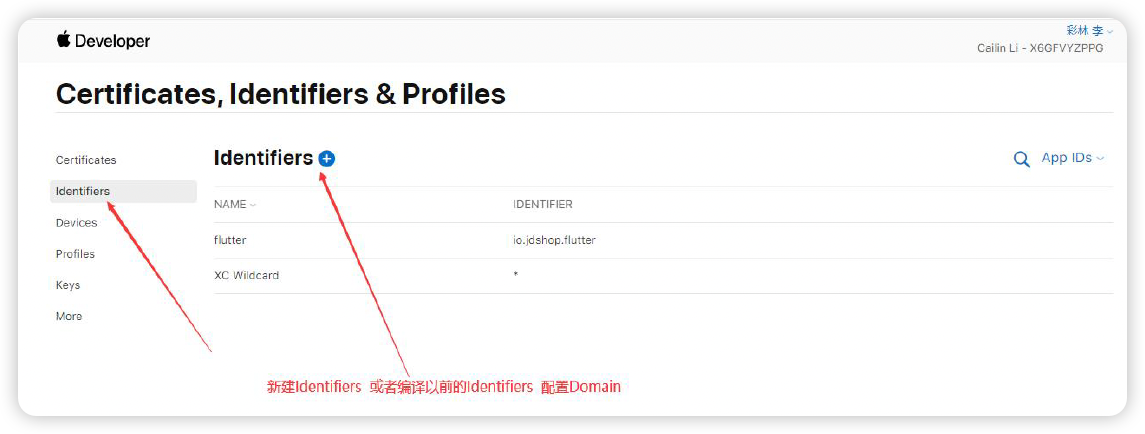
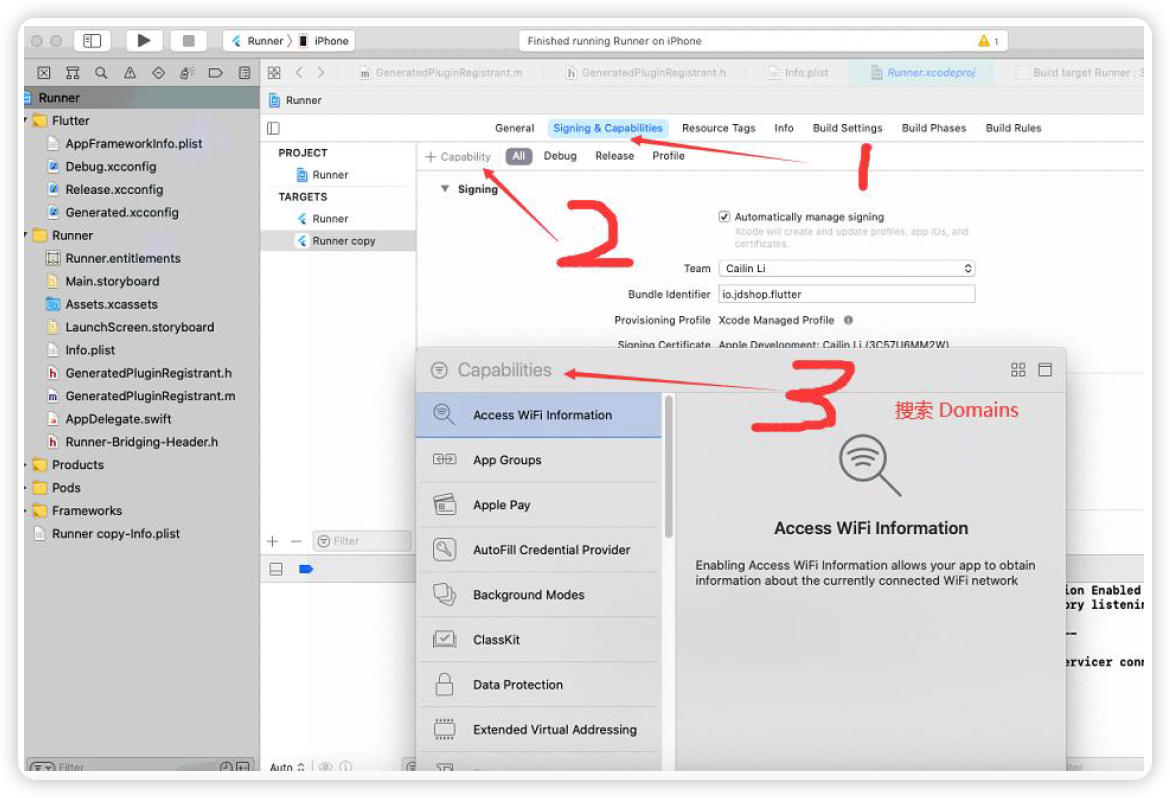
xcode 中配置Associated Domain
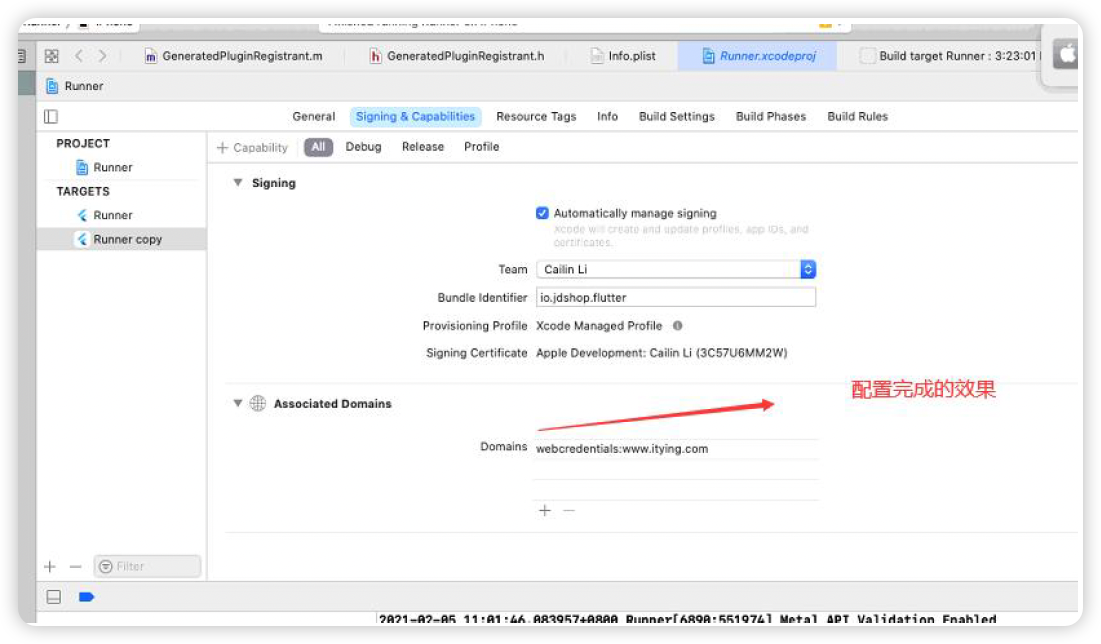
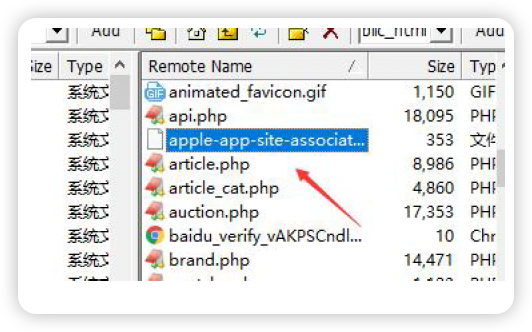
新建:apple-app-site-association 上传服务器根目录,注意没有后缀名。
可以上传到域名根目录或者.well-known 目录,注意域名必须支持https 协议,服务器域名需要和Associated Domains 中配置的一样,apple-app-site-association 文件中的内容如下:
{ "applinks": { "apps": [], "details": [{ "appID": "9JA89QQLNQ.com.apple.wwdc", "paths": [ "/wwdc/news/", "/videos/wwdc/2015/*"] }, { "appID": "X6GFVYZPPG.io.jdshop.com", "paths": [ "*" ] }] } }appID:组成方式是teamId.yourapp’s bundle identifier。如上面的9JA89QQLNQ 就是teamId。登陆开发者中心,在Account -> Membership 里面可以找到Team ID。
paths:设定你的app 支持的路径列表,只有这些指定的路径的链接,才能被app 所处理。星号的写法代表了可识别域名下所有链接。
究竟哪些的url 会被识别为Universal Link,参考:
多个应用配置参考:https://www.jianshu.com/p/38081a1a42ef
{
"applinks": {
"apps": [],
  "details": [{
    "appID": "Q6R52kfR9k.cn.xx.yangtuo1",
    "paths": ["/yangtuo1/*"]
    }, {
      "appID": "Q6R52kfR9k.cn.xx.yangtuo2",
      "paths": ["/yangtuo2/*"]
    }]
  }
}
应用1
Bundle ID:cn.xx.yangtuo1
Universal Links:https://abc.com/yangtuo1/
应用2
Bundle ID:cn.xx.yangtuo2
Universal Links:https://abc.com/yangtuo2/
配置Url Types 参考下图
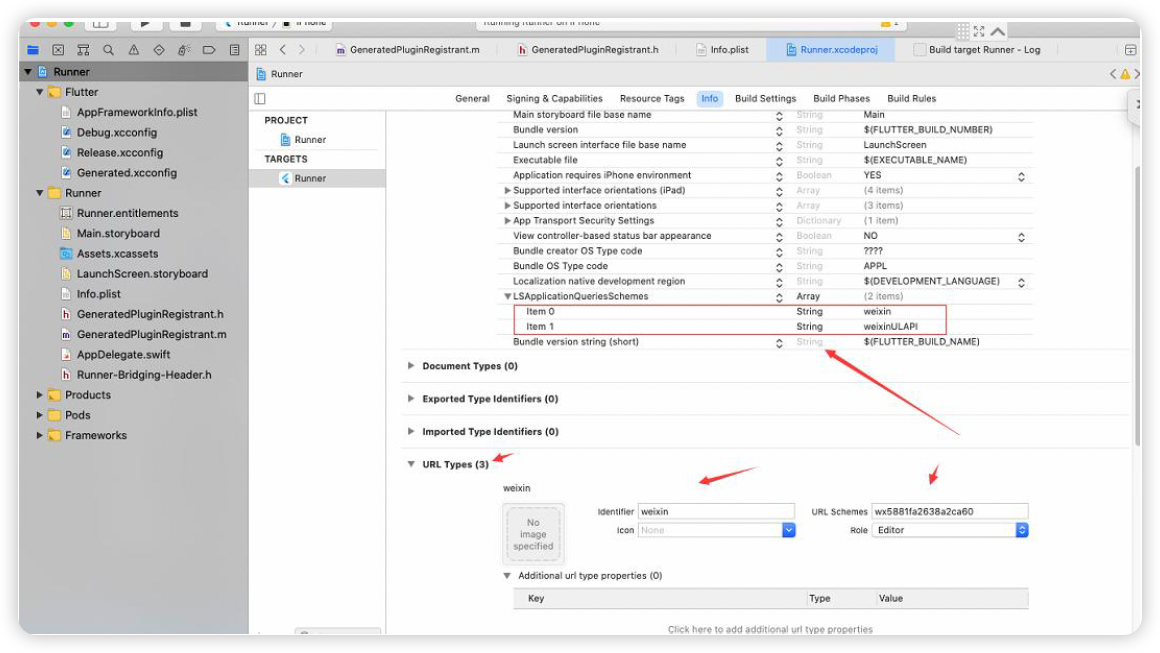
注意:也可以在info.plist 中设置
<key>LSApplicationQueriesSchemes</key>
<array>
<string>weixin</string>
<string>weixinUL</string>
</array>
Flutter 项目集成
universalLink 需要和微信开放平台统一起来
registerWxApi(
appId: "wx5881fa2638a2ca60",
universalLink: "https://www.itying.com/flutter/");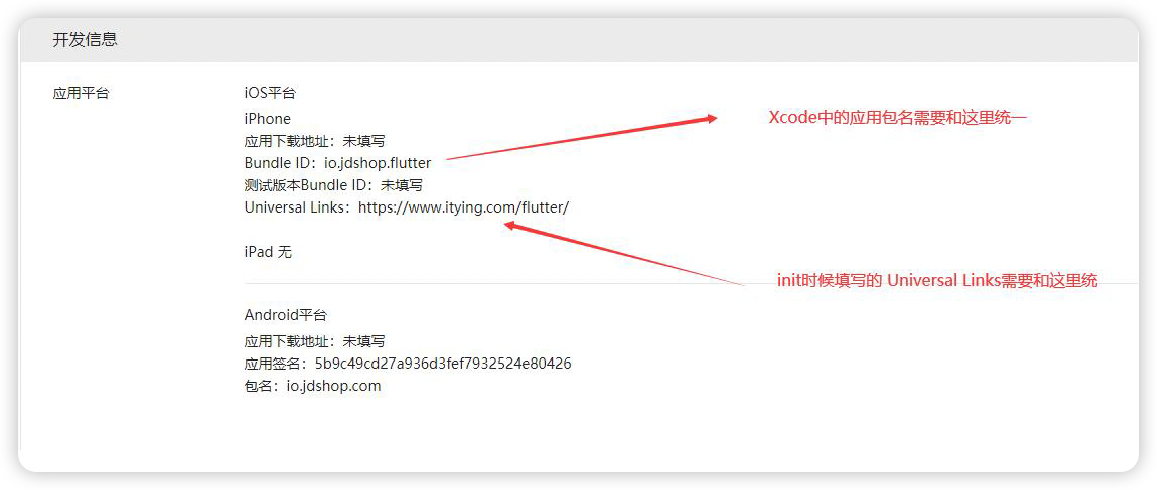
flutter 微信登录微信分享
Flutter 微信登录以及微信分享的准备工作
- 必须在微信开放平台申请成为开发者https://open.weixin.qq.com/
- 必须在微信开放平台创建应用,并配置应用包名和应用签名
- Android Ios 应用包名称必须和微信开放平台配置的一样
- Android 微信登录的时候,微信开放平台配置应用签名的时候使用的keystore 文件必须和正式打包的keystore 签名文件一致
- Ios 中需要配置universalLink, 配置方法和微信支付是一样的
Flutter 微信登录
微信支付、微信登录、微信分享都是一个插件。
https://pub.dev/packages/fluwx
配置依赖
fluwx: ^2.5.0+1引入
import 'package:fluwx/fluwx.dart';注册微信api
void initState() {
  super.initState();
  registerWxApi(
    appId: "wx5881fa2638a2ca60",
    universalLink: "https://your.univerallink.com/link/");
  weChatResponseEventHandler.distinct((a, b) => a == b).listen((res) {
    if (res is WeChatAuthResponse) {
      setState(() {
        print("state :${res.state} \n code:${res.code}");
      });
    }
  });
  weChatResponseEventHandler.listen((res) {
    if (res is WeChatPaymentResponse) {
      setState(() {
        print("pay :${res.isSuccessful}");
      });
    }
  });
}
实现微信支付微信登录微信分享等
body: Center(
  child: Column(
    mainAxisAlignment: MainAxisAlignment.center,
    children: [
      RaisedButton(
        child: Text('微信登录'),
        onPressed: () async {
          // print('微信登录');
          var result = await sendWeChatAuth(
            scope: "snsapi_userinfo", state: "wechat_sdk_demo_test");
          print(result);
        },
      ),
      SizedBox(height: 10),
      RaisedButton(
        child: Text('微信支付'),
        onPressed: () async {
          var apiUrl = 'http://agent.itying.com/wxpay/';
          var myPayInfo = await Dio().get(apiUrl);
          Map myInfo = json.decode(myPayInfo.data);
          payWithWeChat(
            appId: myInfo['appid'].toString(),
            partnerId: myInfo['partnerid'].toString(),
            prepayId: myInfo['prepayid'].toString(),
            packageValue: myInfo['package'].toString(),
            nonceStr: myInfo['noncestr'].toString(),
            timeStamp: myInfo['timestamp'],
            sign: myInfo['sign'].toString(),
          ).then((data) {
            print("---》$data");
          });
        },
      ),
    ],
  ),
),
根据微信授权登录返回的code 获取用户信息
官方文档:
根据code 获取用户信息的接口:
http://agent.itying.com/wxpay/getUserInfo.php?code=021VFy000UjH7L1xc3200P9jT82VFy0N
code 为客户端登录成功后返回的code 信息
Android 中注意事项以及配置signingConfigs
注意:
- 微信开放平台必须配置应用包名和应用签名
- android 应用包名称必须和微信开放平台配置的一样
- 微信开放平台配置应用签名的时候使用的keystore 文件必须和正式打包的keystore 签名文件一致。
- 代码中配置的Appid 必须和开放平台一致
- android 必须正式打包后才能进行微信登录或者微信分享,如果想真机调试可以调用微信登录或者微信分享需要配置签名信息。
Android 中配置signingConfigs:
找到android /app/build.gradle 配置下面代码
signingConfigs {
release {//发布版本的签名配置
storeFile file('jdshop.jks')
keyAlias "仿京东商城"
storePassword "123456"
keyPassword "123456"
}
debug {//调试版本的签名配置
storeFile file('jdshop.jks')
keyAlias "仿京东商城"
storePassword "123456"
keyPassword "123456"
}
}
buildTypes {
release {
// TODO: Add your own signing config for the release build.
// Signing with the debug keys for now, so `flutter run --release` works.
signingConfig signingConfigs.release
}
debug {
// TODO: Add your own signing config for the release build.
// Signing with the debug keys for now, so `flutter run --release` works.
signingConfig signingConfigs.debug
}
}
Ios 中universalLink 和xcode 中的一些配置
微信官方Ios 接入指南:
https://developers.weixin.qq.com/doc/oplatform/Mobile_App/Access_Guide/iOS.html
以前版本的ios 中实现微信支付的话只需要配置Schema 就可以了,但是新版本的ios 中要实现微信支付还需要配置Universal Link。
新建Identifiers 或者编辑以前的Identifiers 开通Associated Domains
xcode 中配置Associated Domain
新建:apple-app-site-association 上传服务器根目录,注意没有后缀名。
配置基本和上面讲到的ios配置一样