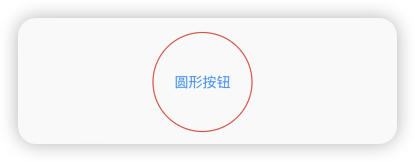
按钮组件的属性
| 属性 |
说明 |
| onPressed |
必填参数,按下按钮时触发的回调,接收一个方法,传null表示按钮禁用,会显示禁用相关样式 |
| child |
子组件 |
| style |
通过ButtonStyle装饰 |
| 属性名称 |
值类型 |
属性值 |
| foregroundColor |
Color |
文本颜色 |
| backgroundColor |
Color |
按钮的颜色 |
| shadowColor |
Color |
阴影颜色 |
| elevation |
double |
阴影的范围,值越大阴影范围越大 |
| padding |
|
内边距 |
| shape |
|
设置按钮的形状 shape: MaterialStateProperty.all(RoundedRectangleBorder(borderRadius: BorderRadius.circular(10))) |
| side |
设置边框 |
MaterialStateProperty.all(BorderSide(width:1,color:Colors.red)) |
ElevatedButton(onPressed: (){}, child: const Text('普通按钮')),
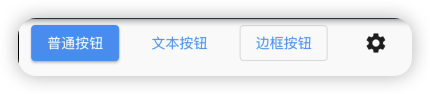
TextButton
TextButton(onPressed: (){}, child: const Text('文本按钮')),
OutlinedButton(onPressed: (){}, child: const Text('边框按钮')),
IconButton(onPressed: (){}, icon: const Icon(Icons.settings))
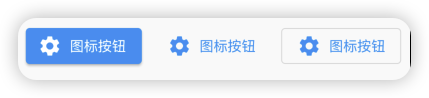
带图标的按钮
ElevatedButton.icon(onPressed: (){}, icon: const Icon(Icons.settings), label: const Text('图标按')),
TextButton.icon(onPressed: (){}, icon: const Icon(Icons.settings), label: const Text('图标按钮')),
OutlinedButton.icon(onPressed: (){}, icon: const Icon(Icons.settings), label: const Text('图标按')),
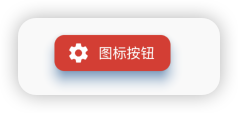
修改按钮属性
ElevatedButton.icon(onPressed: (){}, icon: const Icon(Icons.settings), label: const Text('图标按'), style: ButtonStyle(
    backgroundColor: MaterialStateProperty.all(Colors.red),
    foregroundColor: MaterialStateProperty.all(Colors.white),
    elevation: MaterialStateProperty.all(10),
    shadowColor: MaterialStateProperty.all(Colors.blue),
    shape: MaterialStateProperty.all(const RoundedRectangleBorder(
        borderRadius: BorderRadius.all(Radius.circular(10))
    ))
),),
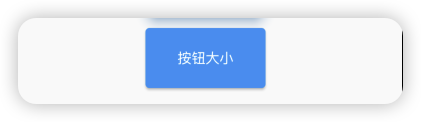
修改按钮的宽度高度
import 'package:flutter/material.dart';
import 'listData.dart';
void main() {
runApp(MaterialApp(
home: Scaffold(
appBar: AppBar(
title: const Text('你好Flutter'),
backgroundColor: Colors.blueGrey[900],
),
body: const MyApp(),
),
));
}
class MyApp extends StatelessWidget {
const MyApp({Key? key}) : super(key: key);
@override
Widget build(BuildContext context) {
return ListView(
children: [
Row(
mainAxisAlignment: MainAxisAlignment.spaceAround,
children: [
ElevatedButton(onPressed: (){}, child: const Text('普通按钮')),
TextButton(onPressed: (){}, child: const Text('文本按钮')),
OutlinedButton(onPressed: (){}, child: const Text('边框按钮')),
IconButton(onPressed: (){}, icon: const Icon(Icons.settings))
],
),
const SizedBox(height: 10),
Row(
mainAxisAlignment: MainAxisAlignment.spaceAround,
children: [
ElevatedButton.icon(onPressed: (){}, icon: const Icon(Icons.settings), label: const Text('图标按钮')),
TextButton.icon(onPressed: (){}, icon: const Icon(Icons.settings), label: const Text('图标按钮')),
OutlinedButton.icon(onPressed: (){}, icon: const Icon(Icons.settings), label: const Text('图标按钮')),
],
),
const SizedBox(height: 10),
Row(
mainAxisAlignment: MainAxisAlignment.spaceAround,
children: [
ElevatedButton.icon(onPressed: (){}, icon: const Icon(Icons.settings), label: const Text('图标按钮'), style: ButtonStyle(
backgroundColor: MaterialStateProperty.all(Colors.red),
foregroundColor: MaterialStateProperty.all(Colors.white),
elevation: MaterialStateProperty.all(10),
shadowColor: MaterialStateProperty.all(Colors.blue),
shape: MaterialStateProperty.all(const RoundedRectangleBorder(
borderRadius: BorderRadius.all(Radius.circular(10))
))
),),
],
),
const SizedBox(height: 10),
Row(
mainAxisAlignment: MainAxisAlignment.spaceAround,
children: [
ElevatedButton(onPressed: (){}, style: ButtonStyle(
minimumSize: MaterialStateProperty.all(const Size(120, 60))
), child: const Text('按钮大小'),),
],
),
],
);
}
}
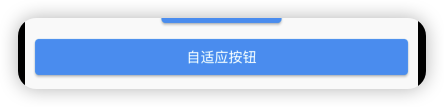
自适应按钮
import 'package:flutter/material.dart';
import 'listData.dart';
void main() {
runApp(MaterialApp(
home: Scaffold(
appBar: AppBar(
title: const Text('你好Flutter'),
backgroundColor: Colors.blueGrey[900],
),
body: const MyApp(),
),
));
}
class MyApp extends StatelessWidget {
const MyApp({Key? key}) : super(key: key);
@override
Widget build(BuildContext context) {
return ListView(
children: [
Row(
mainAxisAlignment: MainAxisAlignment.spaceAround,
children: [
ElevatedButton(onPressed: () {}, child: const Text('普通按钮')),
TextButton(onPressed: () {}, child: const Text('文本按钮')),
OutlinedButton(onPressed: () {}, child: const Text('边框按钮')),
IconButton(onPressed: () {}, icon: const Icon(Icons.settings))
],
),
const SizedBox(height: 10),
Row(
mainAxisAlignment: MainAxisAlignment.spaceAround,
children: [
ElevatedButton.icon(
onPressed: () {},
icon: const Icon(Icons.settings),
label: const Text('图标按钮')),
TextButton.icon(
onPressed: () {},
icon: const Icon(Icons.settings),
label: const Text('图标按钮')),
OutlinedButton.icon(
onPressed: () {},
icon: const Icon(Icons.settings),
label: const Text('图标按钮')),
],
),
const SizedBox(height: 10),
Row(
mainAxisAlignment: MainAxisAlignment.spaceAround,
children: [
ElevatedButton.icon(
onPressed: () {},
icon: const Icon(Icons.settings),
label: const Text('图标按钮'),
style: ButtonStyle(
backgroundColor: MaterialStateProperty.all(Colors.red),
foregroundColor: MaterialStateProperty.all(Colors.white),
elevation: MaterialStateProperty.all(10),
shadowColor: MaterialStateProperty.all(Colors.blue),
shape: MaterialStateProperty.all(const RoundedRectangleBorder(
borderRadius: BorderRadius.all(Radius.circular(10))))),
),
],
),
const SizedBox(height: 10),
Row(
mainAxisAlignment: MainAxisAlignment.spaceAround,
children: [
ElevatedButton(
onPressed: () {},
style: ButtonStyle(
minimumSize: MaterialStateProperty.all(const Size(120, 60))),
child: const Text('按钮大小'),
),
],
),
Row(
mainAxisAlignment: MainAxisAlignment.spaceAround,
children: [
Expanded(
child: Container(
margin: const EdgeInsets.all(10),
child: ElevatedButton(
onPressed: () {},
child: const Text('自适应按钮'),
),
)),
],
),
],
);
}
}
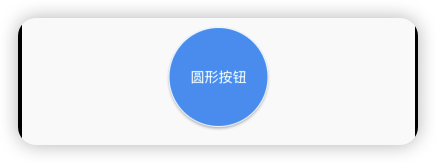
配置圆形圆角按钮
import 'package:flutter/material.dart';
import 'listData.dart';
void main() {
runApp(MaterialApp(
home: Scaffold(
appBar: AppBar(
title: const Text('你好Flutter'),
backgroundColor: Colors.blueGrey[900],
),
body: const MyApp(),
),
));
}
class MyApp extends StatelessWidget {
const MyApp({Key? key}) : super(key: key);
@override
Widget build(BuildContext context) {
return ListView(
children: [
Row(
mainAxisAlignment: MainAxisAlignment.spaceAround,
children: [
ElevatedButton(onPressed: () {}, child: const Text('普通按钮')),
TextButton(onPressed: () {}, child: const Text('文本按钮')),
OutlinedButton(onPressed: () {}, child: const Text('边框按钮')),
IconButton(onPressed: () {}, icon: const Icon(Icons.settings))
],
),
const SizedBox(height: 10),
Row(
mainAxisAlignment: MainAxisAlignment.spaceAround,
children: [
ElevatedButton.icon(
onPressed: () {},
icon: const Icon(Icons.settings),
label: const Text('图标按钮')),
TextButton.icon(
onPressed: () {},
icon: const Icon(Icons.settings),
label: const Text('图标按钮')),
OutlinedButton.icon(
onPressed: () {},
icon: const Icon(Icons.settings),
label: const Text('图标按钮')),
],
),
const SizedBox(height: 10),
Row(
mainAxisAlignment: MainAxisAlignment.spaceAround,
children: [
ElevatedButton.icon(
onPressed: () {},
icon: const Icon(Icons.settings),
label: const Text('图标按钮'),
style: ButtonStyle(
backgroundColor: MaterialStateProperty.all(Colors.red),
foregroundColor: MaterialStateProperty.all(Colors.white),
elevation: MaterialStateProperty.all(10),
shadowColor: MaterialStateProperty.all(Colors.blue),
shape: MaterialStateProperty.all(const RoundedRectangleBorder(
borderRadius: BorderRadius.all(Radius.circular(10))))),
),
],
),
const SizedBox(height: 10),
Row(
mainAxisAlignment: MainAxisAlignment.spaceAround,
children: [
ElevatedButton(
onPressed: () {},
style: ButtonStyle(
minimumSize: MaterialStateProperty.all(const Size(120, 60))),
child: const Text('按钮大小'),
),
],
),
Row(
mainAxisAlignment: MainAxisAlignment.spaceAround,
children: [
Expanded(
child: Container(
margin: const EdgeInsets.all(10),
child: ElevatedButton(
onPressed: () {},
child: const Text('自适应按钮'),
),
)),
],
),
Row(
mainAxisAlignment: MainAxisAlignment.spaceAround,
children: [
SizedBox(
height: 100,
width: 100,
child: ElevatedButton(
onPressed: () {},
style: ButtonStyle(
shape: MaterialStateProperty.all(const CircleBorder(
side: BorderSide(
color: Colors.white,
width: 1,
style: BorderStyle.solid)))),
child: const Text('圆形按钮'),
),
),
],
),
],
);
}
}
import 'package:flutter/material.dart';
import 'listData.dart';
void main() {
runApp(MaterialApp(
home: Scaffold(
appBar: AppBar(
title: const Text('你好Flutter'),
backgroundColor: Colors.blueGrey[900],
),
body: const MyApp(),
),
));
}
class MyApp extends StatelessWidget {
const MyApp({Key? key}) : super(key: key);
@override
Widget build(BuildContext context) {
return ListView(
children: [
Row(
mainAxisAlignment: MainAxisAlignment.spaceAround,
children: [
ElevatedButton(onPressed: () {}, child: const Text('普通按钮')),
TextButton(onPressed: () {}, child: const Text('文本按钮')),
OutlinedButton(onPressed: () {}, child: const Text('边框按钮')),
IconButton(onPressed: () {}, icon: const Icon(Icons.settings))
],
),
const SizedBox(height: 10),
Row(
mainAxisAlignment: MainAxisAlignment.spaceAround,
children: [
ElevatedButton.icon(
onPressed: () {},
icon: const Icon(Icons.settings),
label: const Text('图标按钮')),
TextButton.icon(
onPressed: () {},
icon: const Icon(Icons.settings),
label: const Text('图标按钮')),
OutlinedButton.icon(
onPressed: () {},
icon: const Icon(Icons.settings),
label: const Text('图标按钮')),
],
),
const SizedBox(height: 10),
Row(
mainAxisAlignment: MainAxisAlignment.spaceAround,
children: [
ElevatedButton.icon(
onPressed: () {},
icon: const Icon(Icons.settings),
label: const Text('图标按钮'),
style: ButtonStyle(
backgroundColor: MaterialStateProperty.all(Colors.red),
foregroundColor: MaterialStateProperty.all(Colors.white),
elevation: MaterialStateProperty.all(10),
shadowColor: MaterialStateProperty.all(Colors.blue),
shape: MaterialStateProperty.all(const RoundedRectangleBorder(
borderRadius: BorderRadius.all(Radius.circular(10))))),
),
],
),
const SizedBox(height: 10),
Row(
mainAxisAlignment: MainAxisAlignment.spaceAround,
children: [
ElevatedButton(
onPressed: () {},
style: ButtonStyle(
minimumSize: MaterialStateProperty.all(const Size(120, 60))),
child: const Text('按钮大小'),
),
],
),
Row(
mainAxisAlignment: MainAxisAlignment.spaceAround,
children: [
Expanded(
child: Container(
margin: const EdgeInsets.all(10),
child: ElevatedButton(
onPressed: () {},
child: const Text('自适应按钮'),
),
)),
],
),
Row(
mainAxisAlignment: MainAxisAlignment.spaceAround,
children: [
SizedBox(
height: 100,
width: 100,
child: ElevatedButton(
onPressed: () {},
style: ButtonStyle(
shape: MaterialStateProperty.all(const CircleBorder(
side: BorderSide(
color: Colors.white,
width: 1,
style: BorderStyle.solid)))),
child: const Text('圆形按钮'),
),
),
],
),
const SizedBox(height: 20),
Row(
mainAxisAlignment: MainAxisAlignment.spaceAround,
children: [
SizedBox(
height: 100,
width: 100,
child: OutlinedButton(
onPressed: () {},
style: ButtonStyle(
side: MaterialStateProperty.all(const BorderSide(
color: Colors.red,
width: 1,
style: BorderStyle.solid)),
shape: MaterialStateProperty.all(const CircleBorder())),
child: const Text('圆形按钮'),
),
),
],
),
],
);
}
}